

Toyota’s Infotainment System Guide
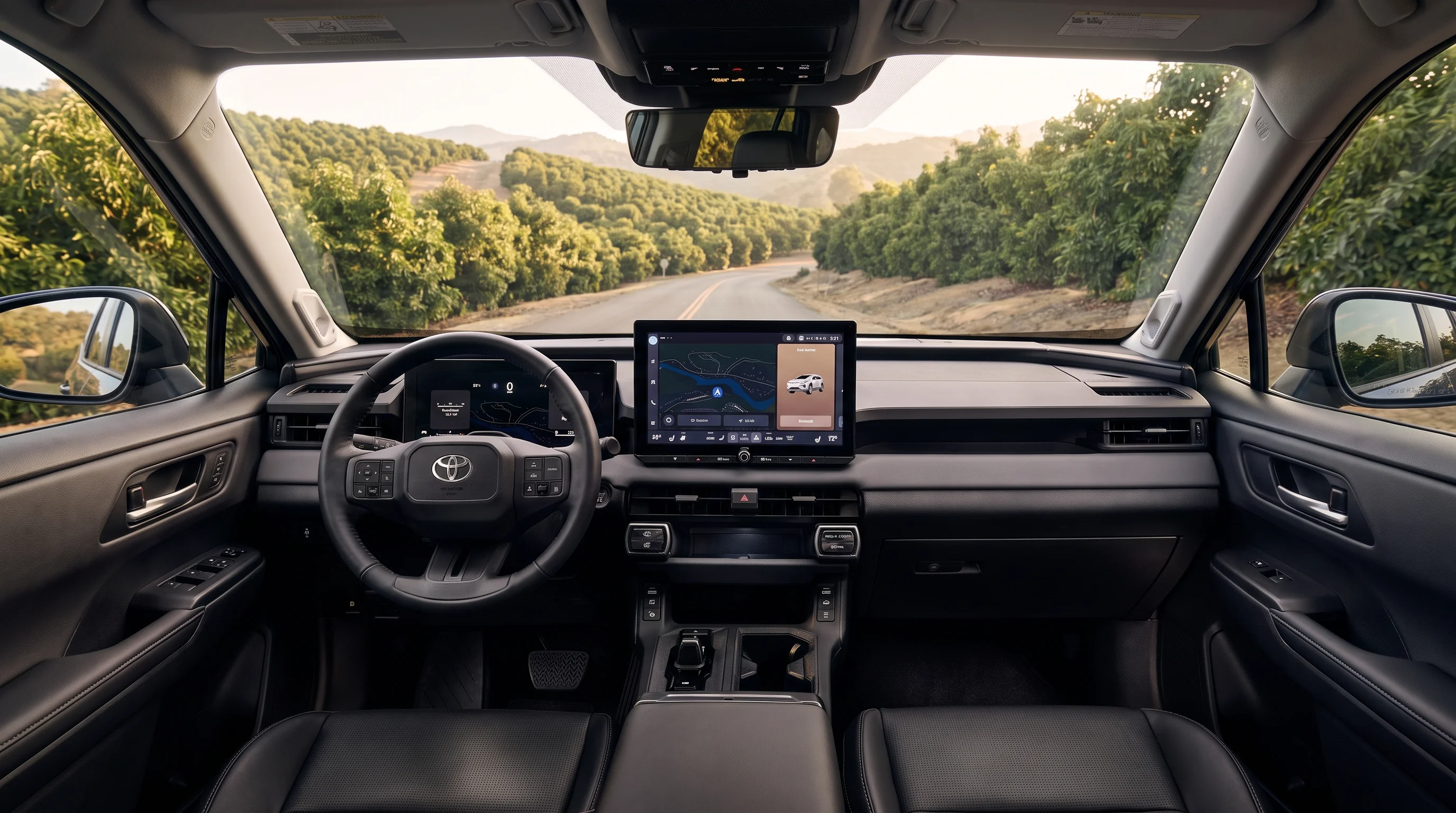
Toyota’s infotainment system — officially called Toyota Audio Multimedia — comes standard with wireless Apple CarPlay and Android Auto compatibility, dual Bluetooth pairing, over-the-air software updates, and personalized user profile management. Cloud-based navigation, voice-activated Intelligent Assistant tools, remote vehicle operation, emergency assistance, maintenance tracking, and an in-vehicle Wi-Fi hotspot arrive through Toyota’s Connected Services suites, which run on complimentary trials and paid subscriptions rather than as standard equipment.
The platform is built around touchscreen displays ranging from 8 inches to 14 inches depending on model and trim, bringing familiar mobile device interfaces straight into the center console. Drivers can mirror smartphone navigation, stream digital audio, send text messages hands-free, and interact with vehicle controls using touch gestures or conversational voice commands. The newest version of Toyota Audio Multimedia debuted on the all-new 2026 RAV4, introducing AT&T 5G network connectivity to the lineup, and it carries into the all-electric 2027 Highlander with a 14-inch screen.
Cited Source: Toyota Audio Multimedia — official platform overview | Toyota USA Newsroom — The Latest Evolution of Toyota’s Multimedia — latest-generation system, 2026 RAV4 launch | Toyota USA Newsroom — 2027 Highlander — latest-generation system on the 2027 Highlander
The Five Connected Services Suites
Connectivity is organized into five suites, each built around a different driver priority:
Safety Connect
Round-the-clock emergency support with an Emergency Assistance Button, Automatic Collision Notification, Stolen Vehicle Locator, and Enhanced Roadside Assistance.
Service Connect
Vehicle Health Reports, maintenance reminders, and alert notifications that keep you current on your vehicle’s condition.
Drive Connect
Cloud Navigation with real-time Google Points of Interest data, 24/7 live Destination Assist agents, and the voice-activated Intelligent Assistant.
Remote Connect
Start the engine, adjust cabin climate, check vehicle status, and lock or unlock doors remotely from a smartphone or smartwatch app.
Wi-Fi Connect
Turns the cabin into an AT&T 4G LTE or 5G hotspot supporting up to five wireless devices, alongside Integrated Streaming for Apple Music, Amazon Music, and — on the 2026 RAV4 — Spotify.
¶ Driver-assist and safety systems are supplemental aids and are not a substitute for safe, attentive driving. Their effectiveness depends on weather, road, and traffic conditions and other factors. Always obey traffic laws and stay attentive to the road. See your owner’s manual for system details and limitations.
Audio performance is tailored specifically to Toyota vehicle cabins. Available premium JBL audio systems incorporate Clari-Fi technology, which restores the sound of digitally compressed audio to add depth and color back into streamed music — whether you are listening to satellite radio or a high-fidelity playlist. For service members commuting from Camp Pendleton, hands-free media syncing and vehicle health alerts make managing an unpredictable schedule noticeably easier.
Cited Source: Toyota Connected Services Plans — official suite contents and plan structure | Toyota JBL Premium Audio — Clari-Fi description
How do wireless Apple CarPlay, Android Auto, and user profiles connect?
| Capability | What the system supports |
|---|---|
| Bluetooth devices paired | Up to five |
| Bluetooth devices active at once | Two |
| User profiles stored | Up to three |
| Smartphone integration | Wireless Apple CarPlay and Android Auto, standard |
| Voice wake word | “Hey Toyota” |
| Software updates | Over-the-air |
Toyota Audio Multimedia lets you pair up to five Bluetooth devices and keep two of them active at the same time for phone calls and music streaming, while storing up to three custom user profiles per vehicle. Wireless Apple CarPlay and Android Auto establish an automated link during initial setup that launches your smartphone’s navigation, messaging, and media apps on the touchscreen every time you start the car.
Connecting your mobile device requires no cable after the primary setup. During initial pairing, the vehicle searches for nearby Bluetooth signals, then prompts you to enable wireless Apple CarPlay or Android Auto permissions on your phone screen. Because two Bluetooth channels stay active at once, a front passenger can stream music while the driver handles incoming calls hands-free.
What your user profile remembers
Custom user profiles store personalized vehicle parameters linked to individual key fobs or mobile devices registered in the Toyota app. Saved profile settings include:
- Touchscreen display preferences and menu layout shortcuts
- Audio equalization presets and favorite radio stations
- Navigation home and work shortcuts plus recent destinations
- Intelligent Assistant settings and voice command preferences
When a driver unlocks the door with their designated key fob or smartphone digital key, the system automatically loads that individual’s profile, restoring custom display shortcuts and audio preferences. Our advisors find that families test-driving a 2026 Camry or RAV4 usually ask how to sync a second smartphone before they even pull out on their first test loop.
Cited Source: Toyota Audio Multimedia Overview — Bluetooth pairing limits and user profile capacity | Toyota Multimedia Help Centre — wireless Apple CarPlay setup and profile structure
Intelligent Assistant Voice Commands and Cloud Navigation
The voice-activated Intelligent Assistant wakes when you say “Hey Toyota” or press the voice command switch on the steering wheel, executing natural-language commands for climate control, audio selection, phone contacts, and Google Points of Interest searches. Cloud Navigation, part of a Drive Connect trial or subscription, continuously pulls real-time traffic updates, dynamic rerouting, and current point-of-interest data from off-board servers.
If your vehicle travels through remote canyons or rural roads where cellular coverage drops, Cloud Navigation continues providing essential route guidance on reduced connectivity. Once the connection is re-established, it refreshes traffic flow data and estimated arrival times in the background.
What you can ask it to do
The Intelligent Assistant processes conversational speech rather than rigid, pre-programmed phrasing. Key voice command capabilities include:
- “Hey Toyota, set the temperature to 70 degrees”
- “Hey Toyota, find coffee shops along my route”
- “Hey Toyota, play my favorite acoustic playlist”
- “Hey Toyota, call home”
Suburban commuters heading out from Murrieta along the I-15 corridor benefit from live traffic rerouting and hands-free voice control during peak drive hours.
Cited Source: Toyota Drive Connect — Cloud Navigation, Google Points of Interest data, Intelligent Assistant and Destination Assist | J.D. Power, “What Is Toyota Drive Connect?” — connectivity behavior
What screen sizes are available across the Toyota lineup?
Toyota Audio Multimedia displays range from 8 inches up to 14 inches depending on the model and trim, with the redesigned 2026 RAV4 running its own 10.5-inch and 12.9-inch screens. Larger displays are standard equipment on many upper trims rather than optional upgrades — a distinction worth knowing before you shop. The lineup is mid-transition right now, so the table below lists each model at the model year currently reaching dealerships.
| Model | Model year status | Standard touchscreen | Larger display |
|---|---|---|---|
| 2027 Camry | On sale now | 8-inch on LE, SE, Nightshade | 12.3-inch standard on XLE and XSE; also available on SE and Nightshade through the Multimedia Upgrade Package |
| 2026 RAV4 | Current model year | 10.5-inch on LE, SE, XLE Premium, Woodland | 12.9-inch standard on XSE and Limited |
| 2027 Highlander | Arriving late 2026 into early 2027 | 14-inch on both XLE and Limited grades | Not offered separately — the 14-inch screen is standard |
| 2026 Tacoma | Current model year | 8-inch on SR, SR5, TRD Sport, TRD Off-Road | 14-inch standard on Limited, Trailhunter, TRD Pro; available on TRD Sport and TRD Off-Road |
| 2026 4Runner | Current model year | 8-inch on SR5 and TRD Sport | 14-inch standard on TRD Sport Premium, TRD Off-Road Premium, Limited, Platinum, Trailhunter, TRD Pro |
Using the screen while driving
Screen operation is restricted while the vehicle is moving. Video playback and media streaming are supported on select equipped vehicles but function only when the vehicle is parked, and the system limits touchscreen interaction once the vehicle exceeds roughly 5 mph. For a closer look at how the displays are laid out inside each cabin, see our 2026 Toyota Camry interior guide and our 2026 Toyota RAV4 interior guide.
Cited Source: Toyota USA Newsroom — The Latest Evolution of Toyota’s Multimedia — 2026 RAV4 screen sizes and AT&T 5G | Toyota USA Newsroom — 2027 Highlander — 2027 Highlander 14-inch touchscreen | Toyota Multimedia Owner’s Manual — screen operation restrictions while driving
What does a Toyota Connected Services subscription cost?
Toyota sells Connected Services in three bundled plans for eligible 2022-and-newer vehicles, and every one of them includes Remote Connect. There is no standalone Remote Connect plan on current multimedia-equipped vehicles. Wi-Fi Connect is sold separately as an optional add-on through AT&T.
| Plan | Price | Remote Connect | What else you get |
|---|---|---|---|
| Music Lover | $15 per month | Included | Integrated Streaming for your existing Apple Music or Amazon Music account, with no data cap on streaming |
| Go Anywhere | $15 per month | Included | Drive Connect — Cloud Navigation, Destination Assist, and Intelligent Assistant |
| Premium | $25 per month | Included | Everything in Music Lover and Go Anywhere combined |
| Wi-Fi Connect | $25 per month (optional add-on) | Not included | AT&T in-vehicle hotspot for up to five devices; also the connection Integrated Streaming runs on |
One condition is easy to miss: Integrated Streaming runs on the vehicle’s own data connection, so it requires an active Wi-Fi Connect subscription alongside your existing Apple Music or Amazon Music account. The Music Lover and Premium plans remove the data cap on that streaming rather than replacing the hotspot subscription.
Over-the-air updates versus paid features
Safety Connect and Service Connect arrive with complimentary trial coverage on new vehicles, and paid plans apply once a trial period ends. Over-the-air software updates are a separate matter: most system stability patches, interface improvements, and bug fixes reach your vehicle without requiring a paid Connected Services subscription, delivered through the onboard cellular connection or a home Wi-Fi network. When an update is ready, a notification appears on the touchscreen asking you to confirm installation — updates only begin once you consent. Subscription-dependent features such as Cloud Navigation still require an active plan to use.
Connected Services features, plan pricing, trial lengths, and availability are determined by Toyota and are subject to change. Features vary by model, model year, trim, and multimedia system.
Cited Source: Toyota Connected Services Plans — current plan names, pricing, and inclusions | Toyota 2026 Audio Multimedia & Connected Services Feature Applicability — plan pricing, trial structure, and Integrated Streaming conditions | Toyota 2027 Audio Multimedia & Connected Services Feature Applicability — 2027 plan pricing continuity | Toyota Multimedia Help Centre — over-the-air update behavior and consent requirement
How to Reset a Toyota Audio Multimedia System
A full system reset clears all personal settings, paired Bluetooth devices, stored navigation addresses, and user profiles, restoring the multimedia system to its factory state. It resolves persistent software issues and is the step Toyota directs owners to complete before selling or trading in a vehicle.
To perform a full reset through the touchscreen:
- Shift the vehicle into Park and leave the ignition on.
- Select the Settings menu and scroll down on the left side of the display.
- Select Info & security.
- Scroll the submenu on the right and tap System reset.
- Select Reset to confirm removal of all users and personal data.
Restarting without erasing anything
For a slow or unresponsive screen that does not require clearing user profiles, Toyota’s multimedia owner’s manual directs owners to press and hold the volume knob for at least three seconds to restart the system. A single profile can also be reset on its own through Settings → Personal info → Reset settings, which restores that profile’s display preferences without deleting the others.
The information in this article is general guidance and does not constitute a specific diagnostic or repair recommendation for any individual vehicle. Repair and maintenance decisions should be made in consultation with a certified technician based on the specific condition of your vehicle.
Cited Source: Toyota Audio Multimedia Change of Ownership Guide — system reset and profile reset menu paths | Toyota Multimedia Owner’s Manual — system restart procedure
Toyota Audio Multimedia: Common Questions
How many Bluetooth devices and user profiles can a Toyota store?
The system pairs up to five Bluetooth devices and keeps two active simultaneously, and it stores up to three user profiles per vehicle. Each profile saves display layouts, audio equalization, navigation shortcuts, and driver preferences linked to individual key fobs or mobile devices.
Does Toyota Cloud Navigation work without cellular service?
Cloud Navigation continues providing essential route guidance when connectivity drops. If you travel through remote areas with limited reception, guidance continues until cellular service reconnects and refreshes live traffic data.
How does Toyota’s Intelligent Assistant voice recognition work?
The Intelligent Assistant wakes when you say “Hey Toyota” or press the voice button on the steering wheel. Using natural language processing, it interprets casual speech to adjust cabin temperature, search Google Points of Interest, change audio tracks, or call saved contacts without taking your hands off the wheel.
How do wireless Apple CarPlay and Android Auto work in Toyota vehicles?
Wireless Apple CarPlay and Android Auto link your smartphone to the touchscreen during an initial setup. Once that setup is complete, your smartphone connects automatically when you enter the vehicle, mirroring navigation, phone, and audio apps cable-free.
Are Toyota over-the-air software updates free?
Most system stability patches and bug fixes delivered over the air do not require a paid Connected Services subscription. Features that depend on a subscription, such as Cloud Navigation, still need an active plan even when the underlying software is current.
Cited Source: Toyota Audio Multimedia Overview — Bluetooth pairing limits and user profile capacity | Toyota Multimedia Help Centre — wireless Apple CarPlay setup and over-the-air update behavior | Toyota 2026 Audio Multimedia & Connected Services Feature Applicability — plan structure and subscription requirements
Our team at Temecula Valley Toyota is here to make setting up and mastering your vehicle’s tech simple. To experience these features on a test drive or explore the current lineup, visit us at 26631 Ynez Road, Temecula, CA 92591, or call (951) 319-7911. You can also browse more Toyota model research before you visit.
Disclaimers
¶ Driver-assist and safety systems are supplemental aids and are not a substitute for safe, attentive driving. Their effectiveness depends on weather, road, and traffic conditions and other factors. Always obey traffic laws and stay attentive to the road. See your owner’s manual for system details and limitations.
The information in this article is general guidance and does not constitute a specific diagnostic or repair recommendation for any individual vehicle. Repair and maintenance decisions should be made in consultation with a certified technician based on the specific condition of your vehicle.
Connected Services features, plan pricing, trial lengths, and availability are determined by Toyota and are subject to change. Features vary by model, model year, trim, and multimedia system.
Cited Sources
- Toyota Connected Services Plans — plan names, pricing, inclusions, and suite contents
- Toyota JBL Premium Audio — Clari-Fi description
- Toyota Audio Multimedia Overview — Bluetooth pairing limits and user profile capacity
- Toyota Multimedia Help Centre — wireless Apple CarPlay setup and over-the-air update behavior
- Toyota Drive Connect — Cloud Navigation, Google Points of Interest data, and Destination Assist
- Toyota USA Newsroom — The Latest Evolution of Toyota’s Multimedia — 2026 RAV4 display sizes and AT&T 5G connectivity
- Toyota USA Newsroom — 2026 Highlander — Highlander display availability
- Toyota Multimedia Owner’s Manual — screen operation restrictions while the vehicle is moving
- Toyota Multimedia Owner’s Manual — system restart procedure
- Toyota Audio Multimedia Change of Ownership Guide — system reset and profile reset menu paths
- J.D. Power, “What Is Toyota Drive Connect?” — connectivity behavior
- Toyota Audio Multimedia — official platform overview
- Toyota 2026 Audio Multimedia & Connected Services Feature Applicability — plan pricing, trial structure, Integrated Streaming and hotspot conditions
- Toyota 2027 Audio Multimedia & Connected Services Feature Applicability — 2027 plan pricing continuity
- Toyota USA Newsroom — 2027 Highlander — 14-inch touchscreen and latest-generation system on the all-electric Highlander